
Compare a photo at three stages: the original source, the downloaded export, and the actual posted or received view. Use the same region and similar display sizes, and record the settings that changed. This helps identify whether the problem began locally or appeared later without guessing at a platform's private processing.
A screenshot of a small social preview and a full-screen camera original are not an equal test. They can be useful observations, but they do not establish an exact quality loss, stored resolution or encoder rule.
Keep the three stages separate
Save the original first. Then give each export a distinct name rather than repeatedly overwriting the same file. If the original is an editable project or HDR photo, retain it as well as the delivery copy.
For the posted stage, record what you actually inspected: an opened feed post, profile thumbnail, story draft or saved chat attachment. These are different views and can answer different questions.
Do not label a screenshot “the file Instagram stores.” It is a capture of one displayed presentation. Similarly, a chat thumbnail does not prove the dimensions or bytes of the attachment the receiver downloads.
Record a small comparison sheet
| Item | What to record |
|---|---|
| Source | Filename you recognize, original dimensions and format |
| Local crop | Shape, subject position and any removed content |
| Export | Format, dimensions and actual bytes |
| Processing | Quality choice, sharpening and any byte cap |
| Environment | Browser or editor and version where available |
| Transfer | App, route, relevant quality setting and date |
| Observation | View inspected, display size and the exact issue |
Do not publish private filenames, personal images or account details in a public report. A local record can use neutral labels such as source-A and export-A.
If you are testing a private document, keep it on your device. There is no need to send its bytes to an analytics or image-comparison service just to inspect two local versions.
Compare the local export before uploading
Open the original and exported copy at similar sizes. Check a difficult textured region, smooth gradient, face and any small lettering. Confirm crop and orientation too.
Use 1:1 for a pixel-level inspection, then view at the intended size. A difference visible in a close inspection may have little impact on the actual task, while tiny unreadable text can be a problem even without obvious compression artifacts.
If the export is already unsuitable, fix that stage first. An app quality setting cannot restore the detail missing from the file you supply.
Use the local synthetic example appropriately
The JPEG quality guide includes actual downloads made from one synthetic fixture. It keeps 1200×1600 pixels, disables sharpening and the byte cap, and changes JPEG quality in Chromium 151.0.7922.34.
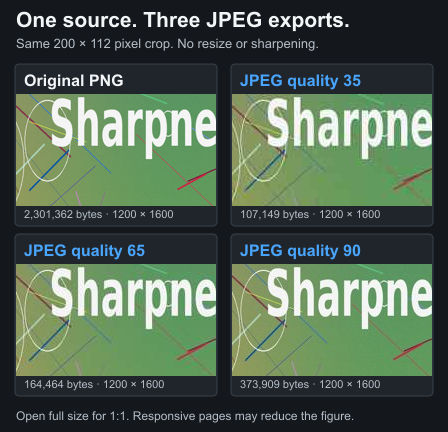
The manifest records bytes, hashes, dimensions and the environment. This makes those outputs inspectable. It does not establish average savings, which quality every photograph needs, or what a later social upload will do.
Use the same care with your own comparison. Label measured output separately from an illustrative crop or screenshot. Never turn one result into a claim that every image follows a fixed threshold.
Change one factor at a time
For a JPEG comparison, set Custom's byte cap to 0 (off), then hold source, crop and dimensions constant while changing quality. For sharpening, keep that cap off and hold quality, crop and dimensions constant while comparing off and light. An active cap may change encoding quality or dimensions, adding another variable.
For a platform setting, keep the prepared file constant and change only the setting you intend to test, where the app permits it. Record the route and the actual result instead of assuming the setting guarantees a particular encoder.
Changing five controls together may find a version you like, but it cannot isolate which control caused the difference. Be precise about the conclusion you can draw.
Inspect the actual destination view
For Instagram, check the opened post and profile preview separately. The quality-settings guide explains variable menu labels without promising one path for every account.
For WhatsApp or Telegram, decide whether you are comparing photo media or a document/file handoff. Have the receiver inspect the saved attachment when exact detail matters. The WhatsApp guide and Telegram guide explain those choices.
A matching file size is not a complete identity check. If you need byte-for-byte verification, use a local checksum utility and compare the actual downloaded files. A similar-looking preview answers a different question.
Treat color and HDR as a separate variable
An image can appear brighter or more colorful on one display without a simple JPEG quality explanation. Record the devices and whether an HDR or SDR version was inspected.
Android's Ultra HDR guidance describes different display capabilities. Adobe's HDR export documentation explains SDR preview and tone-mapping decisions.
Use the HDR and SDR workflow for that case. Increasing sharpening or bytes is not a controlled way to diagnose color appearance.
Run a practical comparison
- Keep a clear original and record its format and pixels.
- Choose one crop and a useful output size.
- Make a first export and inspect it locally.
- Change one setting for a second fresh export from the original.
- Record the actual downloaded bytes and observed differences.
- Inspect the destination view separately and limit the conclusion to that test.
The browser tool makes a local copy. A later post or message is a separate action. This page does not perform platform uploads or claim a controlled account experiment on your behalf.
Limits and checklist
- Distinguish source, export, screenshot and attachment.
- Compare the same region at similar sizes.
- Record actual settings and output bytes.
- Change one factor at a time.
- Keep HDR/display differences separate from sharpness.
- Describe what the evidence proves and what it does not.
Source review: 20 October 2026. References: the named Android and Adobe documentation, browser export specification, and the downloadable manifest linked from the JPEG guide. This is a method for useful observations, not a guarantee that platform behavior repeats across accounts or versions.