
Guides
Practical guides to image sizes, compression and social sharing, with source links and clear limits.
Search by platform, task or file size.
No matches. Try another search or category.
Image basics
Why Is My Compressed Image Bigger Than the Original?
Find why a new image export can use more bytes: format changes, existing compression, resizing, sharpening and padding. Compare the actual files before sharing.
Transparent PNG or White JPG: Choose the Right Background
Keep an existing transparent background with PNG, or flatten it onto white for a JPG. Check logo edges, pale artwork and the downloaded file before sharing.
Social Media Image Quality: Prepare Clear, Sharp Photo Exports
Choose a source, crop, format and sharing route for clearer social photos. Separate local export settings from Instagram, WhatsApp and Telegram controls.
Telegram Photo Quality: Send in HD or Share the Original File
Choose Telegram HD photos or a file handoff, prepare a smaller copy only when useful, and check the received download without assuming fixed pixel limits.
Prepare Product Photos for Listings Without Hiding Detail
Build consistent product-photo copies from originals, keep important edges visible, inspect labels and color, and check each listing's image requirements.
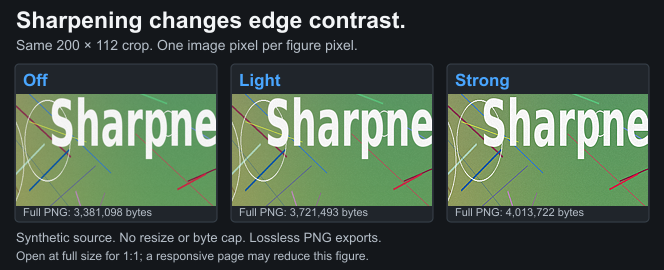
Photo Sharpening Halos: Fix Harsh Edges Before Posting
Recognize bright outlines, noise and harsh lettering from excessive sharpening. Compare restrained settings at fixed dimensions and keep the original.
One Photo, Several Social Sizes: Keep a Master and Review Each Crop
Prepare square, portrait and landscape copies from one original. Organize export groups, review every crop and avoid enlarging yesterday's delivery JPEG.
Keep Text and Screenshots Sharp When Sharing on Social Media
Check lettering, crop useful content, compare PNG and JPEG, and prepare a readable social image. File size and sharpening alone cannot fix a crowded layout.
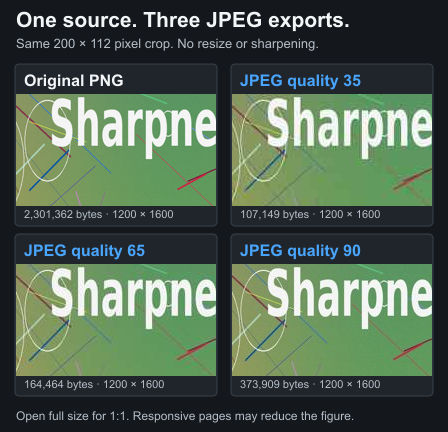
JPEG Quality Settings: Compare 60, 80 and 100 on Your Image
Learn what JPEG quality controls, why 100 is not a lossless guarantee, and how to compare bytes and artifacts. Browser quality numbers are not universal scores.
Reduce Photo Size on Android or iPhone: Pixels and KB
Use Samsung Gallery, iPhone format options or a browser tool to make a smaller photo copy. Set a KB cap when needed and inspect the actual downloaded file.
HEIC to JPG for Social Media: iPhone Options and Browser Limits
Convert an iPhone HEIC photo to JPEG for a destination that needs it. Check browser support, keep the original and inspect the exported image before posting.
HDR Photos Look Washed Out? Compare an SDR Export Before Posting
Separate HDR display behavior, color changes and JPEG artifacts. Keep the original and compare a deliberate SDR copy before preparing a social photo.
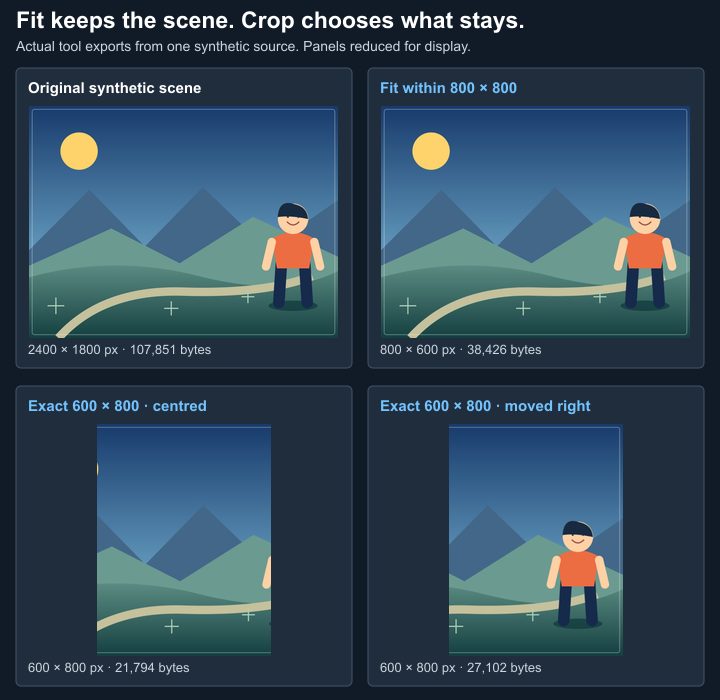
Crop, Resize or Fit: Choose the Right Social Photo Export
Learn which control removes content, changes pixels or fits within bounds. Prepare social photos deliberately and avoid confusing Fit with automatic padding.
Compare Original, Exported and Posted Photos Fairly
Track the source, export and posted view at comparable sizes. Record crop, format and settings so a blurry social photo leads to a useful comparison.
YouTube
Forms & exams
Photo and Signature Sizes for Exam Forms: Check Your Notice
Read SSC, UPSC, NEET, JEE and bank photo instructions, then set format, pixels and KB limits. Presets are examples; check your current notification.
Compress an Image to 20 KB, 50 KB or 100 KB on Your Phone
Set a photo's KB cap, required pixels and optional minimum, then inspect the downloaded file. Understand quality tradeoffs and check your portal's rules.
Why Is My Instagram Story Blurry? Photo Checks and Export Tips
Check a blurry Instagram story's source, crop, text and export. Prepare a 1080×1920 still and inspect interface overlap without fixed-quality guarantees.
Why Does Instagram Compress Photos? Causes of Blurry Uploads
Understand resizing, JPEG artifacts, screenshots and crops behind blurry Instagram photos. Check the original and export without promising a lossless post.
Instagram Profile Picture Blurry? Crop and Export Fixes
Fix a blurry Instagram profile picture by checking the original, square crop, circle preview and JPEG export. Use 720×720 as a starting choice, not a guarantee.
Instagram 3:4 Grid Crops: Preview a Post Before Uploading
Understand a 3:4 thumbnail crop, compare 4:5 and square artwork, and keep important content visible. Check Instagram's actual preview before posting.
Instagram Carousel Size: Prepare Consistent Photo Slides
Choose one export size for Instagram carousel photos, check crops and ordering, and prepare multi-panel designs. Verify the current composer before posting.
How to Upload Sharp Photos on Instagram: A Practical Checklist
Prepare an Instagram photo from the original. Choose a crop, inspect resizing and light sharpening, then check the upload without a lossless-quality promise.
How to Upload HD Photos on Instagram: Quality Settings
Find Instagram's Upload at highest quality setting, check a blurry photo before posting, and prepare a clear export without assuming a lossless upload.
How to Compress Photos for Instagram and Check the Result
Crop and resize an Instagram photo, compare JPEG quality, and export from a phone or editor. Keep the original and understand why smaller is not lossless.